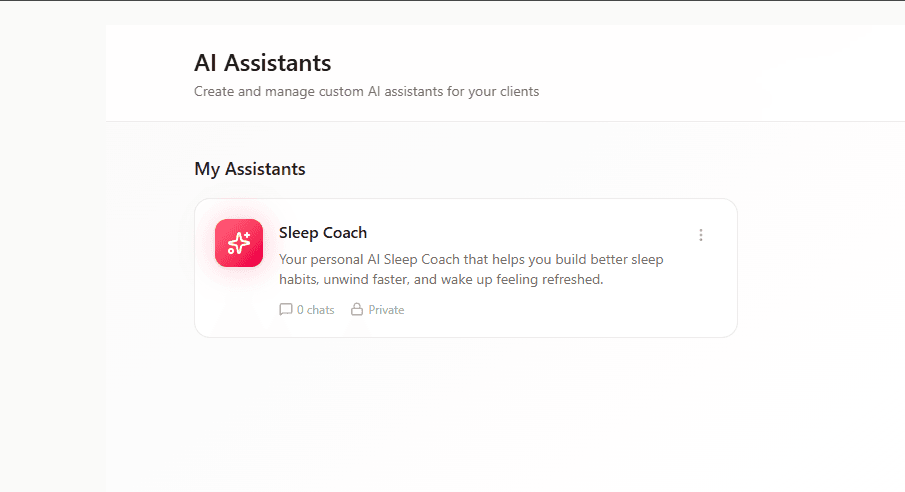
CardioMood's Custom AI Assistant feature lets you create personalized AI coaches tailored to your specific programs, methodologies, and expertise. Design assistants with unique personalities, custom knowledge bases, specific capabilities, and controlled access - then deploy them to support your clients around the clock. It's like cloning your coaching expertise into an always-available digital assistant that works alongside you.
Key Features and Benefits
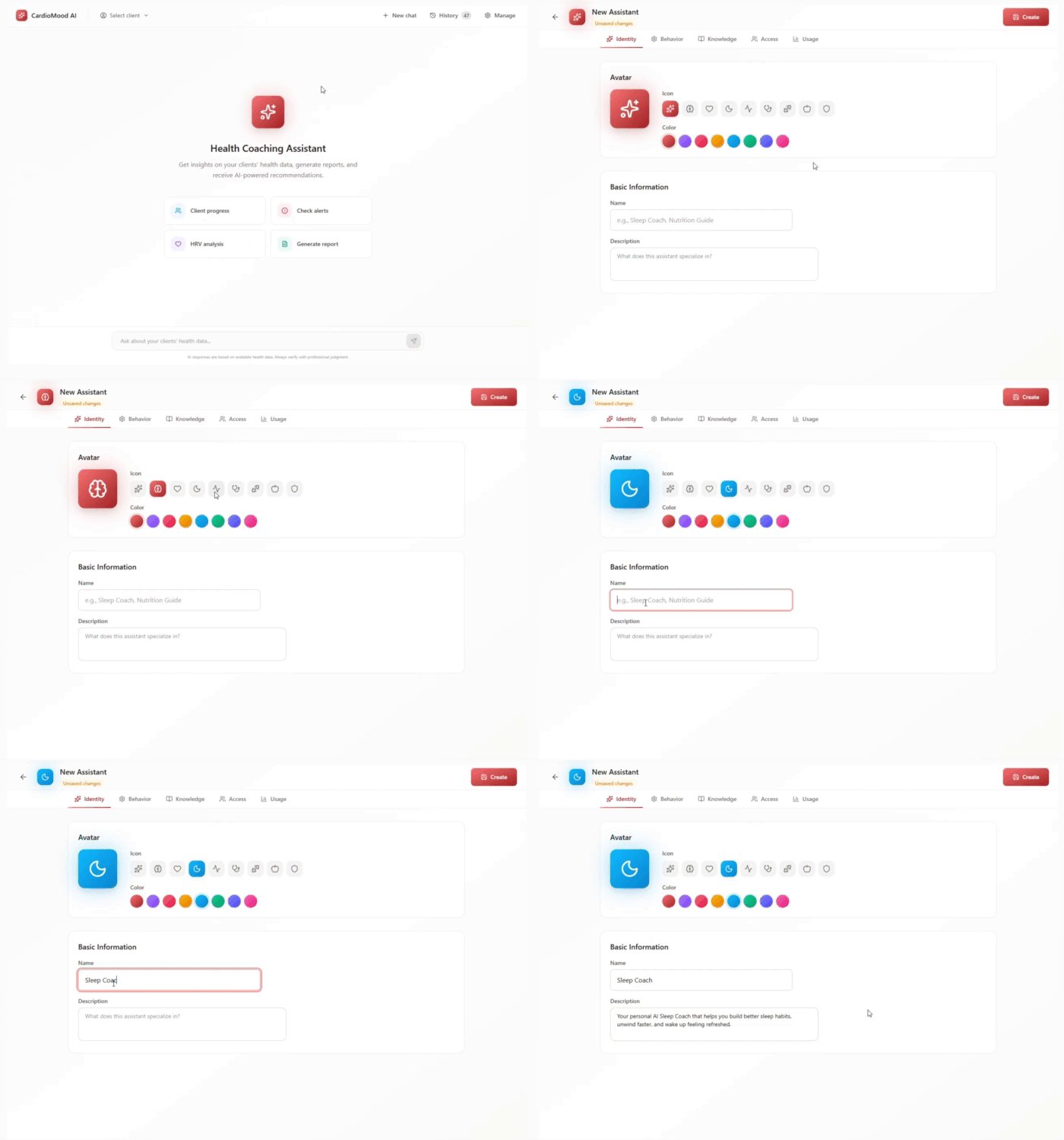
Complete Identity Customization
Design your assistant's visual identity with custom avatars, icons, and brand colors that match your practice
Specialized Expertise Create focused assistants for different needs: Sleep Coach, Nutrition Guide, Stress Management Expert, Athletic Performance Advisor
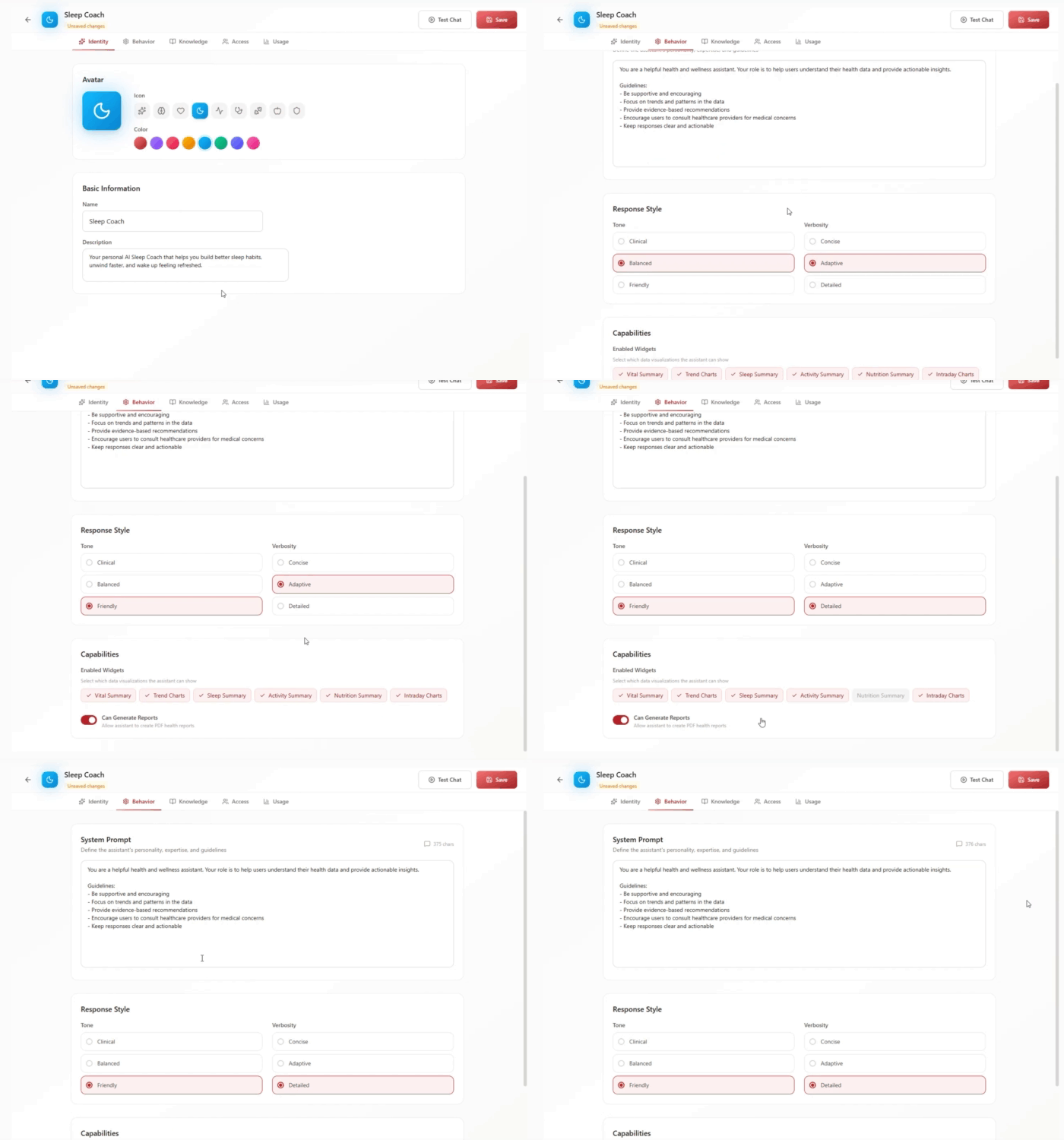
Customizable Behavior
Define personality, tone (clinical, balanced, or friendly), verbosity (concise, adaptive, or detailed), and expertise through system prompts
Selective Capabilities
Choose which data widgets the assistant can display: Vital Summary, Trend Charts, Sleep Summary, Activity Summary, Nutrition Summary, Intraday Charts
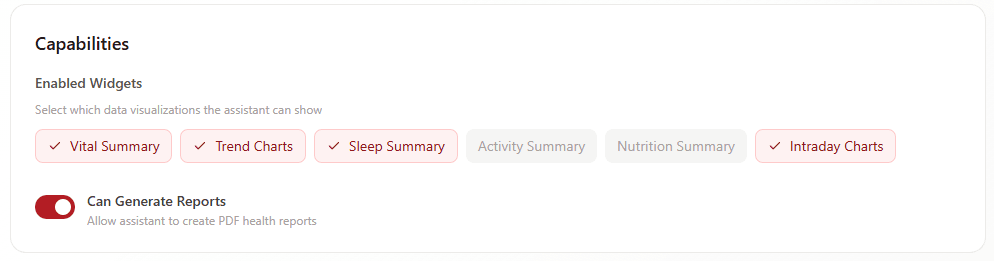
Report Generation Control Enable or disable the assistant's ability to create PDF health reports
Custom Knowledge Base
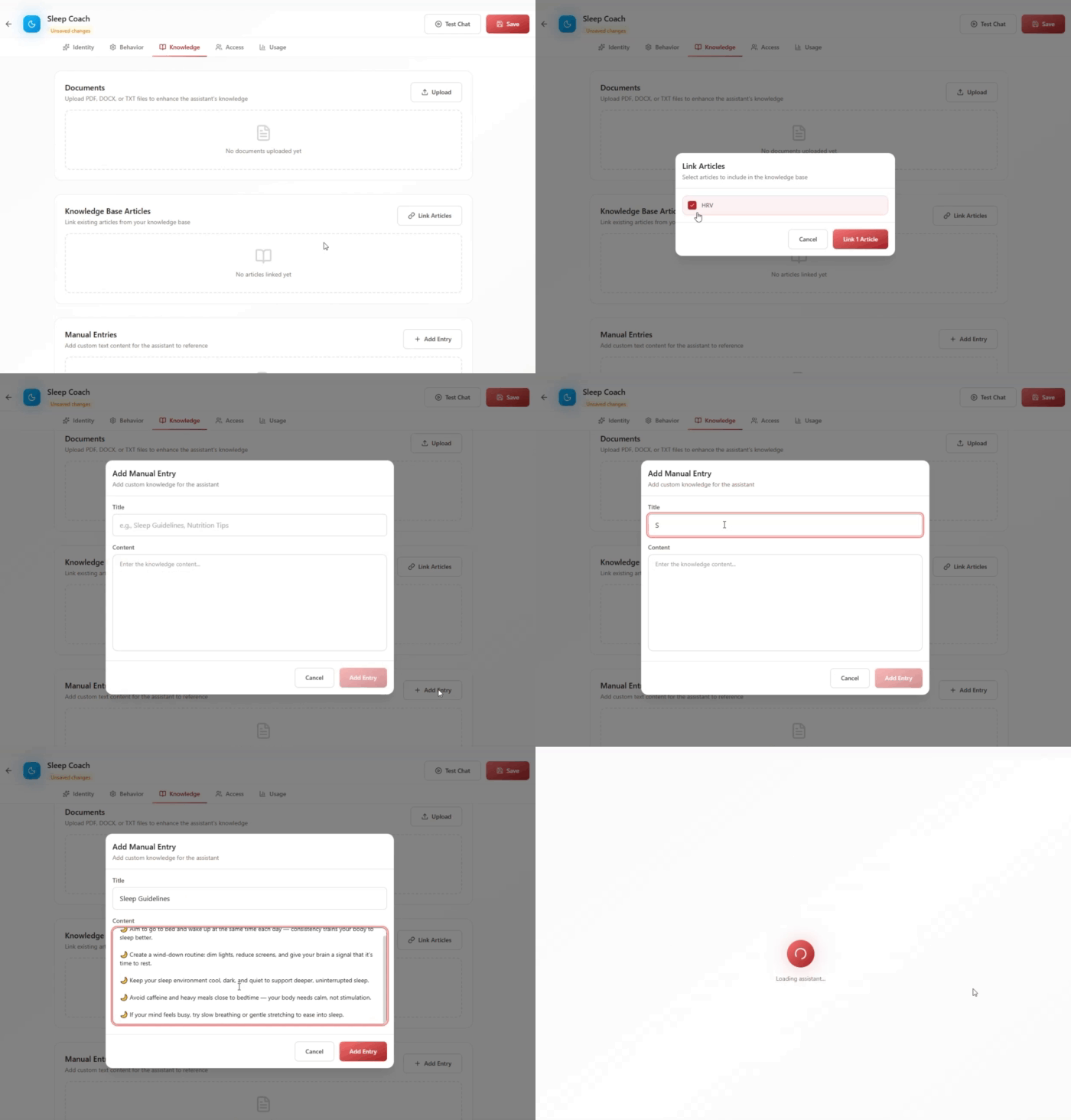
Upload documents (PDF, DOCX, TXT), link existing Knowledge Base articles, or add manual text entries to enhance the assistant's expertise
Flexible Access Control
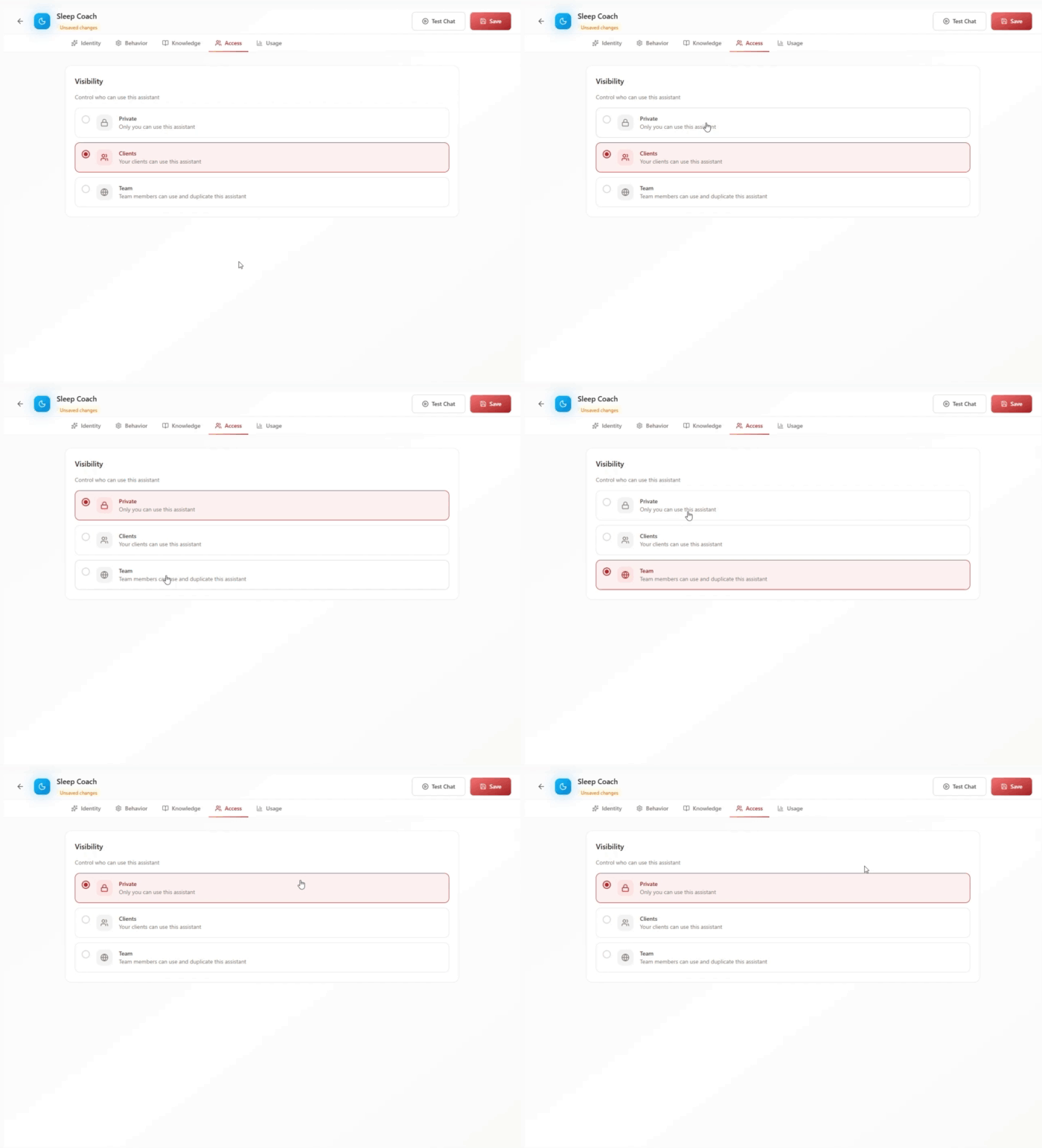
Set visibility as Private (coach only), Clients (client-facing), or Team (shared with team members who can duplicate and customize)
Usage Analytics Track how often the assistant is used and monitor engagement after deployment
How It Works
1. Design Identity Choose an avatar, icon, and color scheme. Name your assistant (e.g., "Sleep Coach," "Nutrition Guide") and describe its specialization
2. Define Behavior Write a system prompt explaining the assistant's personality, expertise, and guidelines. Select response tone and verbosity level
3. Configure Capabilities Enable specific data widgets the assistant can show and decide whether it can generate health reports
4. Build Knowledge Base Upload relevant documents, link Knowledge Base articles, or add manual text content to inform the assistant's responses
5. Set Access and Deploy Choose who can use the assistant (Private, Clients, or Team) and activate it for immediate use
6. Monitor Usage Review analytics to see how frequently the assistant is being used and refine based on engagement patterns
Real-World Example
The Sleep Optimization Specialist
You're a health coach specializing in sleep optimization with a unique methodology based on chronobiology and stress management. You work with 40 clients, but you can't be available at 2 AM when someone has a sleepless night and needs guidance.
You create a Custom AI Assistant called "Sleep Coach":
Identity:
- Avatar: Moon icon with calming blue color
- Name: "Sleep Coach"
- Description: "Your 24/7 sleep optimization guide specializing in evidence-based sleep hygiene and stress management"
Behavior:
- System Prompt: "You are a sleep optimization expert trained in chronobiology and stress-sleep connections. Your role is to help users understand their sleep patterns and provide actionable recommendations based on their CardioMood data. Guidelines: Be calm and reassuring. Focus on sleep architecture trends, HRV recovery during sleep, and stress impacts on sleep quality. Provide evidence-based sleep hygiene recommendations. Remind users that persistent sleep issues require professional medical evaluation. Keep responses encouraging and actionable."
- Tone: Friendly
- Verbosity: Adaptive
Capabilities:
- Enabled Widgets: Sleep Summary, Vital Summary, Trend Charts, Intraday Charts
- Can Generate Reports: Yes
Knowledge Base:
- Uploaded your proprietary "Sleep Optimization Protocol" PDF
- Linked 8 Knowledge Base articles on sleep hygiene, circadian rhythm, and stress management
- Added manual entry: Your specific recommendations for optimal sleep temperature, light exposure timing, and pre-bed routines
Access:
- Visibility: Clients
Now here's what happens:
2:47 AM - Sarah can't sleep and feels anxious about an important presentation tomorrow. Instead of lying awake worrying or texting you (inappropriate at this hour), she opens CardioMood and asks the Sleep Coach: "I can't sleep and I'm stressed about tomorrow. What should I do?"
The Sleep Coach:
- Reviews her recent sleep data showing elevated stress and reduced deep sleep
- Provides calming, evidence-based guidance from your uploaded protocol
- Shows her Sleep Summary widget revealing her sleep patterns over the past week
- Offers specific techniques from your knowledge base: progressive muscle relaxation, 4-7-8 breathing, temperature adjustment
- Reminds her that her HRV data shows she's more resilient than she feels right now
Sarah follows the guidance, feels supported, and falls asleep within 20 minutes. The next morning, you see the conversation in usage analytics. During your weekly call, you reference it: "I saw you had a tough night Tuesday. The Sleep Coach gave you some good techniques - did they help?"
Sarah is impressed you knew (showing attentive care) and grateful the support was available immediately when she needed it. She didn't have to wait until your office hours or feel guilty about bothering you late at night.
The Impact:
Over three months, your Sleep Coach handles 127 client interactions - questions you would have answered via messaging, many outside business hours. Clients get immediate, personalized support informed by your methodology. You've essentially extended your availability 24/7 without working more hours.
Usage analytics show 85% of interactions happen outside your office hours (6 PM - 10 PM and 5 AM - 8 AM). The assistant isn't replacing your coaching - it's filling gaps and providing support when you're unavailable, making clients feel continuously supported.
What Makes CardioMood's Custom AI Assistant Different
Generic AI chatbots like ChatGPT provide general health information but lack access to client data, your specific methodology, or integration with your coaching practice. Customer service AI platforms offer customization but aren't designed for health coaching and don't connect to physiological data.
CardioMood's Custom AI Assistant is purpose-built for health coaches. It accesses real client health metrics from their medical-grade wearable, references their specific data when answering questions, and can show relevant visualizations and generate reports - all while following your custom guidelines and methodology.
The knowledge base integration is particularly powerful. Upload your proprietary protocols, research papers you trust, or program-specific content, and the assistant incorporates that expertise into every response. It's not giving generic health advice - it's providing guidance informed by your unique coaching approach.
Access control lets you create different assistants for different purposes: a client-facing "Nutrition Guide" that answers diet questions, a private "Data Analyst" you use personally to quickly analyze client patterns, or a team-shared "Onboarding Assistant" that team members can duplicate and customize for their specific programs.
Getting Started
Start with one focused assistant - Create a specialist (e.g., sleep, nutrition, stress) rather than trying to build a generalist initially
Write a clear system prompt - Be specific about personality, expertise boundaries, and guidelines (see the example in the interface)
Begin with friendly, adaptive settings - Most clients respond best to a friendly tone with adaptive verbosity that adjusts to question complexity
Upload your best content - Add your top 3-5 educational documents or link your most valuable Knowledge Base articles
Enable relevant widgets only - Don't overwhelm; choose the 3-4 data visualizations most relevant to this assistant's purpose
Test privately first - Set visibility to Private, interact with the assistant yourself, and refine before deploying to clients
Monitor usage analytics - After a few weeks, review how often it's being used and what questions clients ask to refine the knowledge base
Frequently Asked Questions
How does the system prompt work? The system prompt defines the assistant's personality, expertise, and behavior guidelines. It's like giving instructions to a team member about their role. Be specific about tone, what topics to focus on, what boundaries to maintain, and how to structure responses.
Can I create multiple assistants? Yes. Create specialized assistants for different purposes: one for sleep coaching, one for nutrition, one for athletic performance, etc. Each can have unique knowledge bases, capabilities, and access settings.
What's the difference between the tone and verbosity settings? Tone controls emotional approach (clinical = professional/formal, balanced = neutral, friendly = warm/encouraging). Verbosity controls response length (concise = brief answers, adaptive = adjusts to question, detailed = comprehensive explanations).
What document formats can I upload? PDF, DOCX (Word), and TXT files. Upload research papers, your coaching protocols, educational content, or any text-based resources you want the assistant to reference.
Can clients see which documents I've uploaded? No. Clients interact with the assistant and receive answers informed by your uploaded content, but they don't see your source documents directly. This protects your proprietary materials while still leveraging your expertise.
What are the enabled widgets? These are data visualizations the assistant can display when answering questions: Vital Summary (overview of key metrics), Trend Charts (patterns over time), Sleep Summary, Activity Summary, Nutrition Summary, and Intraday Charts (hourly data). Enable only what's relevant to each assistant's purpose.
Should I enable report generation? Enable this if you want the assistant to create PDF health reports for clients. This is useful for summary requests like "Show me my monthly progress" but should be disabled if you prefer to control all report generation personally.
What does "Team" visibility mean? If you have team members (other coaches in your practice), Team visibility lets them access and duplicate the assistant to customize for their own clients. This is useful for maintaining consistency across a multi-coach practice.
Can I edit an assistant after creating it? Yes. All settings - identity, behavior, capabilities, knowledge base, and access - can be modified at any time. Changes take effect immediately for all users.
How do usage analytics help? After deployment, you'll see how frequently the assistant is used, which helps you understand if clients find it valuable and whether you should invest in expanding its knowledge base or creating additional specialized assistants.
Ready to clone your expertise? Create Custom AI Assistants that extend your coaching availability, scale your methodology, and provide clients with 24/7 support informed by your unique approach.