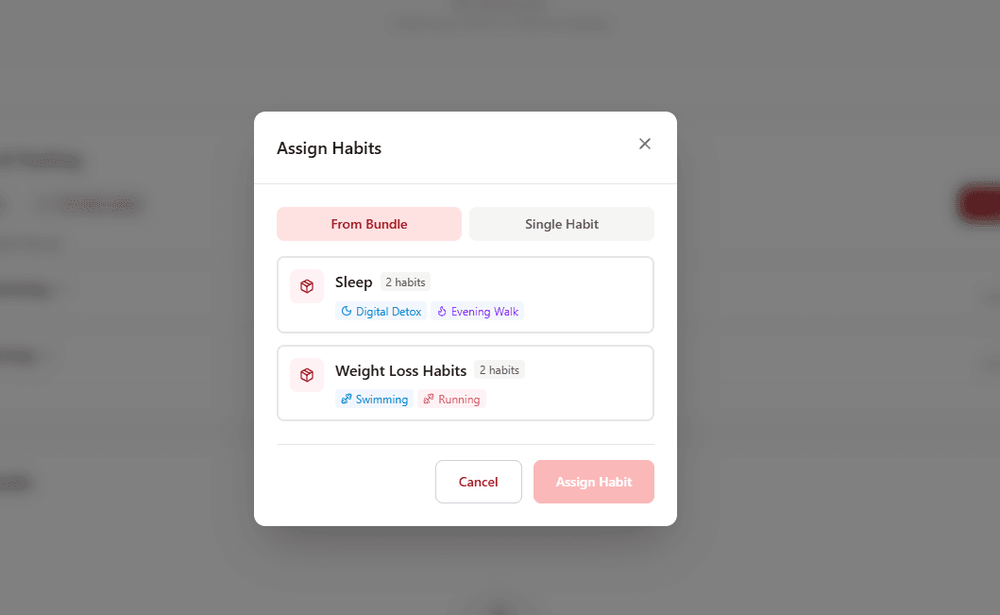
CardioMood's Habit Tracking feature helps clients build and maintain healthy behaviors through goal setting, progress tracking, streak counting, and visual progress indicators. Unlike standalone habit apps, CardioMood connects habit completion to physiological outcomes - showing clients exactly how their daily actions impact their sleep quality, stress levels, HRV, and overall health. This data-driven feedback loop dramatically improves adherence and motivation.
Key Features and Benefits
Habit Bundles for Easy Assignment
Create bundles of related habits (e.g., "Weight Loss Program" with 5 habits) and assign to clients with one click
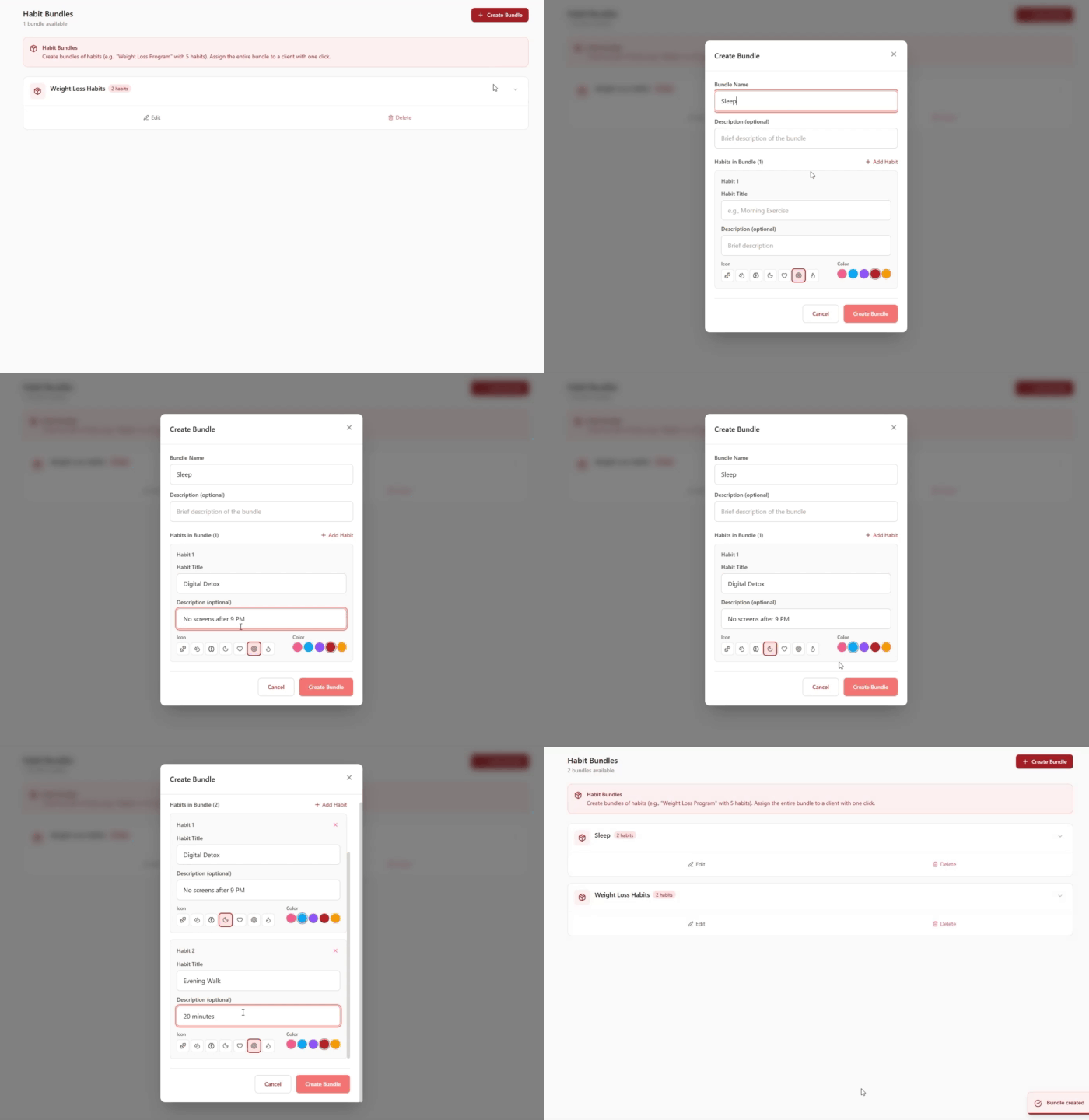
Custom Habit Creation
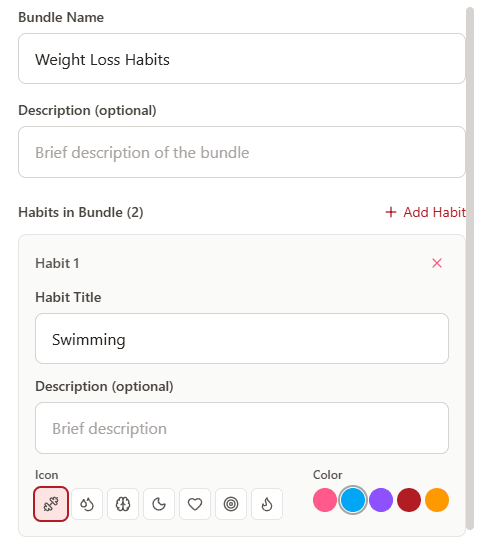
Design any habit you want clients to build with customizable titles, descriptions, icons, and colors
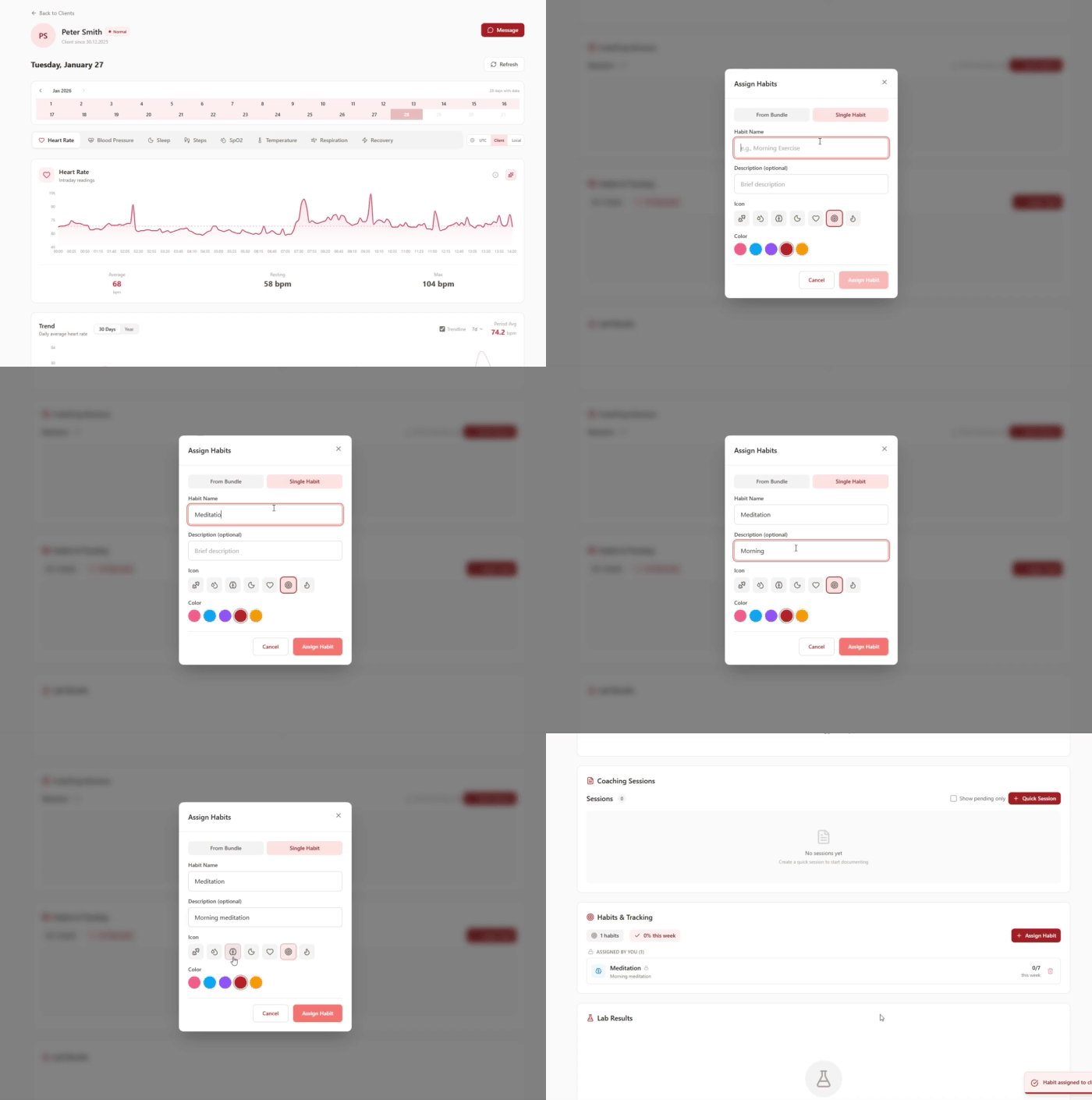
Flexible Assignment Options
Assign complete habit bundles or individual habits directly from the client dashboard
Visual Progress Tracking
Clients and coaches see completion percentages, weekly progress, and streak counters for motivation
Icon and Color Customization Make habits visually distinct and engaging with custom icons and color coding
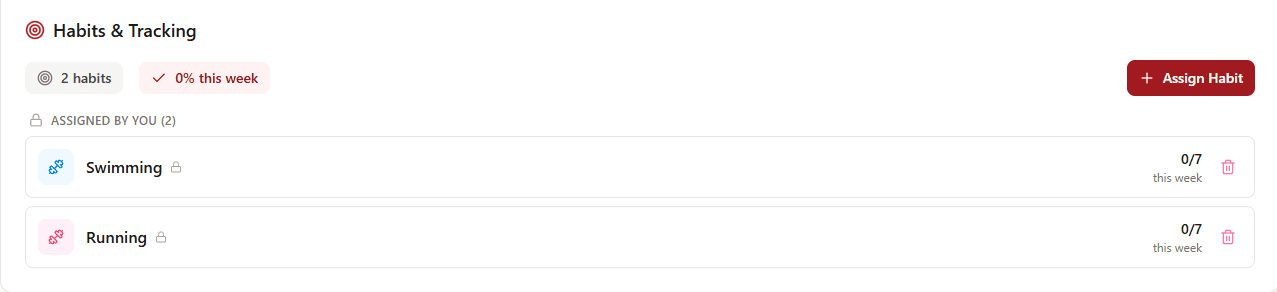
Integrated Dashboard View Habits appear alongside client health metrics in their profile under "Habits & Tracking"
Correlation Analysis The AI automatically shows clients how habit completion correlates with their physiological improvements
Coach Oversight Monitor all clients' habit adherence from your dashboard without micromanaging individual check-ins
How It Works
1. Create Habit Bundles or Single Habits Build themed bundles (e.g., "Morning Routine," "Stress Management Protocol") with multiple habits, or create standalone habits for individual assignment
2. Customize Each Habit Add a title, optional description, select an icon from the library, and choose a color to make each habit visually distinct
3. Assign to Clients Navigate to any client's dashboard, find the "Habits & Tracking" section, click "Assign Habits," and choose either a pre-built bundle or single habit
4. Track Progress and Correlations Monitor completion percentages, view weekly adherence, and let the AI show clients how their habits impact their physiological metrics
Real-World Example
The Meditation Skeptic
David is a 38-year-old finance professional with chronically elevated stress levels shown in his CardioMood data. You've created a "Stress Resilience Bundle" containing:
- Morning Meditation - 10 minutes (🧘 purple icon)
- Evening Walk - 20 minutes (🚶 pink icon)
- Gratitude Journal - 5 minutes (📓 blue icon)
- Digital Sunset - No screens after 9 PM (📱 orange icon)
- Deep Breathing - 3 rounds before bed (💨 red icon)
You assign the entire bundle to David with one click from his dashboard. In his "Habits & Tracking" section, it initially shows "5 habits, 0% this week."
Here's what happens:
Week 1: David completes habits inconsistently - 42% completion rate. His stress levels don't change much yet, but the visual tracking keeps him engaged.
Week 2: He hits 71% completion, motivated by seeing his progress bar climb. The system shows him an automated insight: "Your average HRV on days you complete 3+ habits: 58ms. On days with fewer habits: 51ms." Data is starting to show impact.
Week 3: He achieves 86% completion. The correlation analysis in his app now shows a clear pattern: days with morning meditation and evening walks consistently correlate with 8% higher HRV, better sleep efficiency that night, and lower stress scores throughout the day.
Week 4: David is a convert. The habits are sticking not because you nagged him, but because his own physiological data proved the benefit. He can see in objective metrics that the bundle directly improves his stress resilience and recovery.
You can see his progress in your dashboard without asking. When his completion percentage drops to 45% one week, you proactively reach out: "David, I noticed your habit completion dipped this week - everything okay?" This demonstrates your attention and care.
Six months later, David maintains an 82% average completion rate and considers the bundle non-negotiable. The habit tracking feature - combined with physiological feedback - turned a skeptic into a believer through data, not willpower alone.
What Makes CardioMood's Habit Tracking Different
Standalone habit apps like Streaks or Habitica track completion but have no idea whether habits are actually improving your health. They rely on self-reported feelings and subjective progress.
CardioMood's Habit Tracking closes the feedback loop by connecting behaviors to physiological outcomes. When clients complete their "drink 8 glasses of water" habit, the system can show them how their hydration correlates with sleep quality, recovery scores, and cognitive performance markers. When they skip workouts for three days, they see their HRV drop and stress levels rise.
The Habit Bundles feature is particularly powerful for scaling your coaching practice. Create a "Sleep Optimization Bundle," "Athletic Performance Bundle," or "Postpartum Recovery Bundle" once, then assign it to dozens of clients instantly. Each client gets a personalized experience without you manually building habit lists for every individual.
This data-driven approach transforms habit building from abstract self-improvement into concrete cause-and-effect relationships. Clients aren't just checking boxes to maintain a streak - they're watching their body respond positively to their choices. This intrinsic motivation is far more powerful and sustainable than gamification alone.
Getting Started
Create your first habit bundle - Build a bundle around your most common coaching program (e.g., "New Client Essentials" with 3-5 foundational habits)
Customize icons and colors - Make habits visually appealing and easy to distinguish at a glance
Assign to a test group - Try your bundle with 3-5 clients first to refine before broader rollout
Monitor the Habits & Tracking section - Check client dashboards to see completion percentages and identify who needs support
Create single habits for specific needs - Not every client needs a full bundle; assign individual habits for targeted interventions
Build a bundle library - Develop bundles for different programs, goals, or client types to streamline assignments
Frequently Asked Questions
How many habits can I include in a bundle? There's no technical limit, but we recommend 3-7 habits per bundle to avoid overwhelming clients. Research shows that focusing on fewer behaviors leads to better long-term adherence than trying to change everything at once.
Can I assign both bundles and individual habits to the same client? Yes. You might assign a "Morning Routine Bundle" plus individual habits specific to their unique situation. The "Habits & Tracking" section shows all assigned habits regardless of how they were added.
Can clients see how many habits they've completed? Absolutely. Clients see their completion percentage for the week and their progress on each individual habit. The visual feedback - like seeing "4 of 5 habits completed this week (80%)" - is motivating.
What happens if I edit a bundle after assigning it to clients? Changes to bundles only affect future assignments. Clients who already have the bundle assigned keep their original version unless you manually reassign the updated bundle.
Can I duplicate bundles to create variations? While not explicitly mentioned, you can create multiple bundles with similar habits customized for different client types or program levels (e.g., "Beginner Sleep Bundle" vs. "Advanced Sleep Bundle").
What's the correlation analysis feature? The AI automatically analyzes relationships between habit completion and physiological metrics. For example, it might show "You complete your morning walk 85% of the time, and on those days your stress levels average 23% lower." This provides data-driven motivation.
Can I create bundles for different programs I offer? Yes. Create separate bundles for each coaching program you run: "Weight Loss Program," "Athletic Performance," "Stress Management," "Postpartum Recovery," etc. This makes client onboarding fast and consistent.
Where do I assign habits to clients? Navigate to any client's dashboard and scroll to the "Habits & Tracking" section. Click "Assign Habits" and choose either a bundle or single habit. The section shows how many habits they have and their completion percentage.
Ready to make behavior change stick? Help clients build lasting habits with tracking that proves their efforts are working at a physiological level.