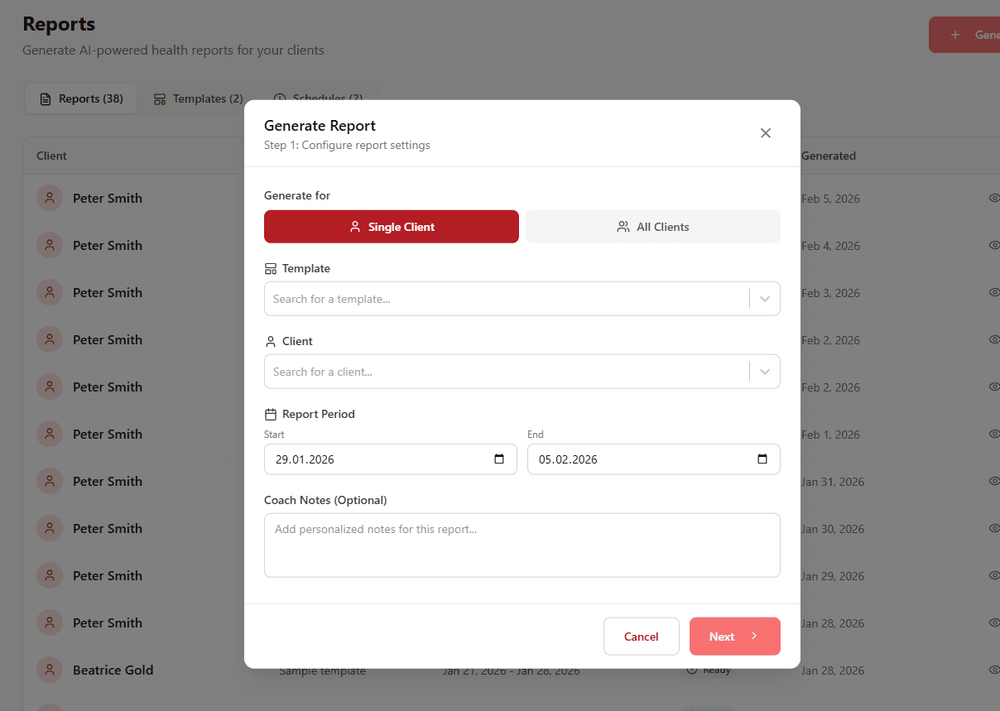
CardioMood's Health Reports feature transforms weeks of complex physiological data into beautiful, professional PDF reports in seconds. Whether you need monthly progress summaries, detailed health assessments, or documentation for client records, the AI compiles comprehensive reports that showcase results, explain patterns, and highlight your coaching impact - without hours of manual work.
Key Features and Benefits
One-Click Generation Create professional multi-page reports in just a few minutes that would take 45+ minutes to build manually
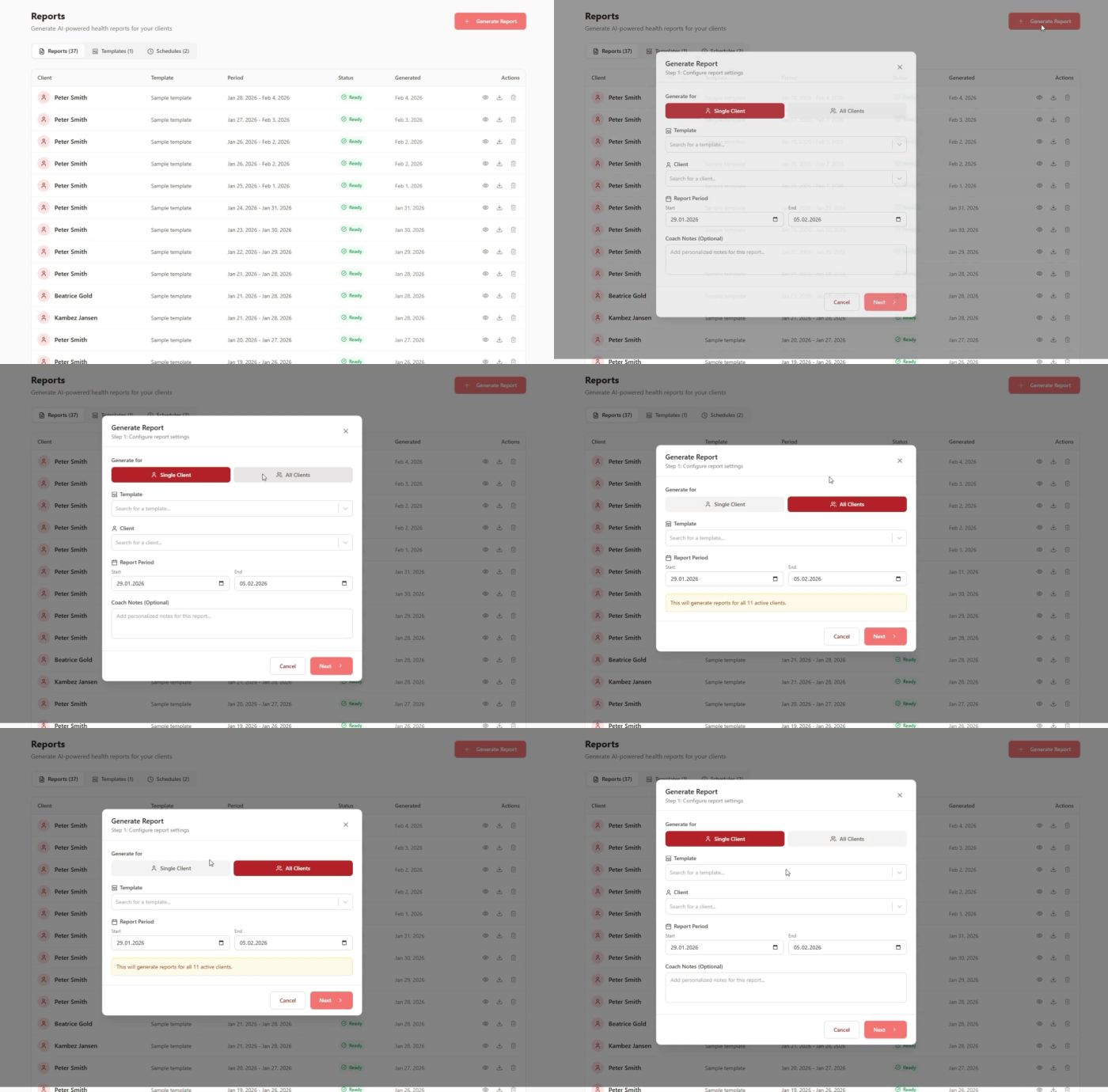
Single or Bulk Creation
Generate reports for individual clients or create reports for your entire client roster simultaneously
Customizable Templates
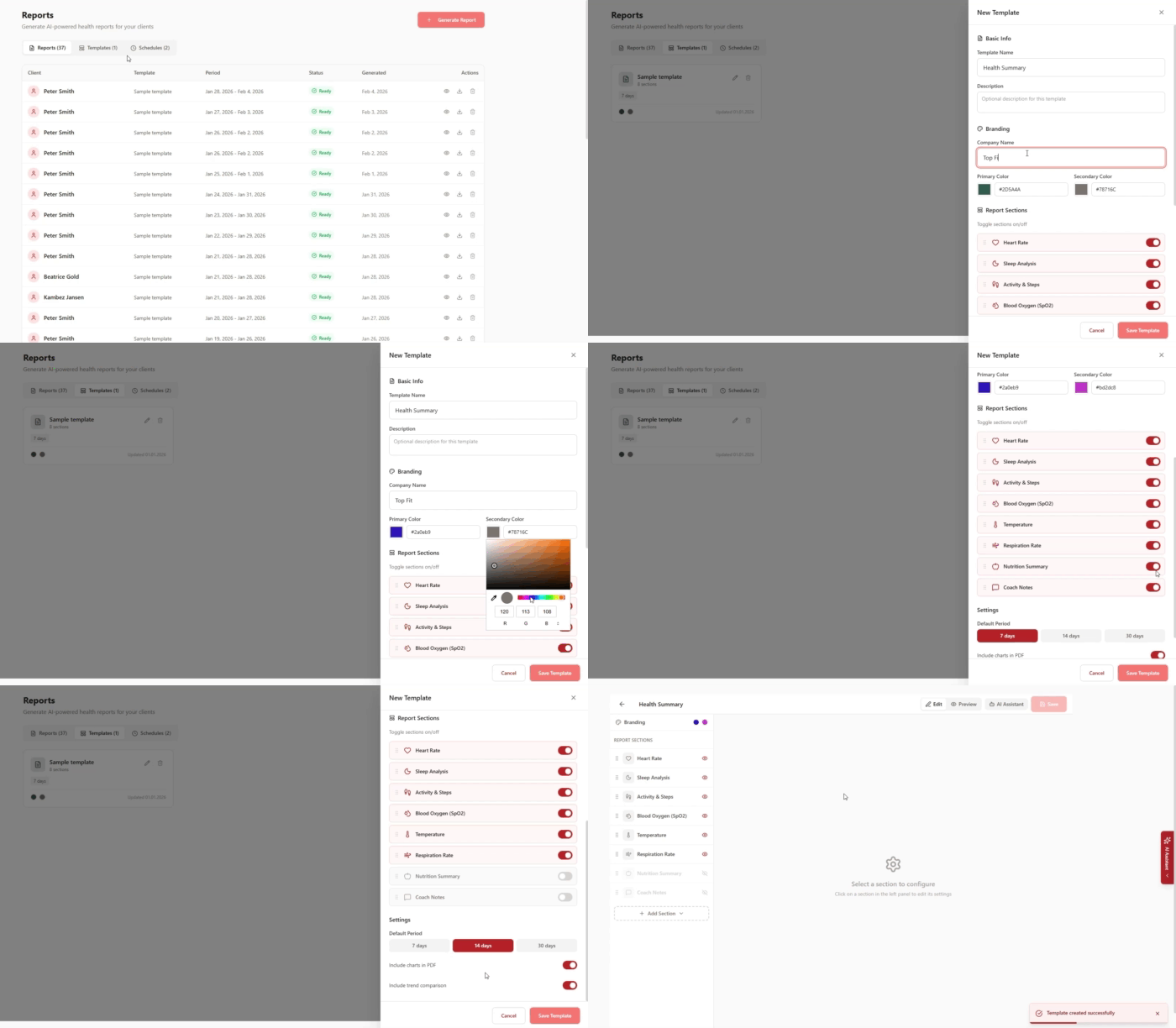
Design reusable templates with your choice of sections: Heart Rate, Sleep Analysis, Activity & Steps, SpO2, Temperature, Respiration Rate, Nutrition Summary, and Coach Notes
Flexible Reporting Periods Choose from preset periods (7, 14, or 30 days) or select custom date ranges from the calendar
Complete Branding Control
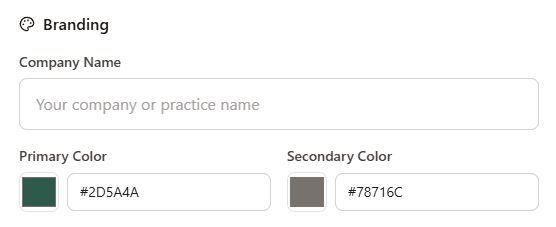
Add your company name and customize primary and secondary brand colors for every report
Automated Scheduling
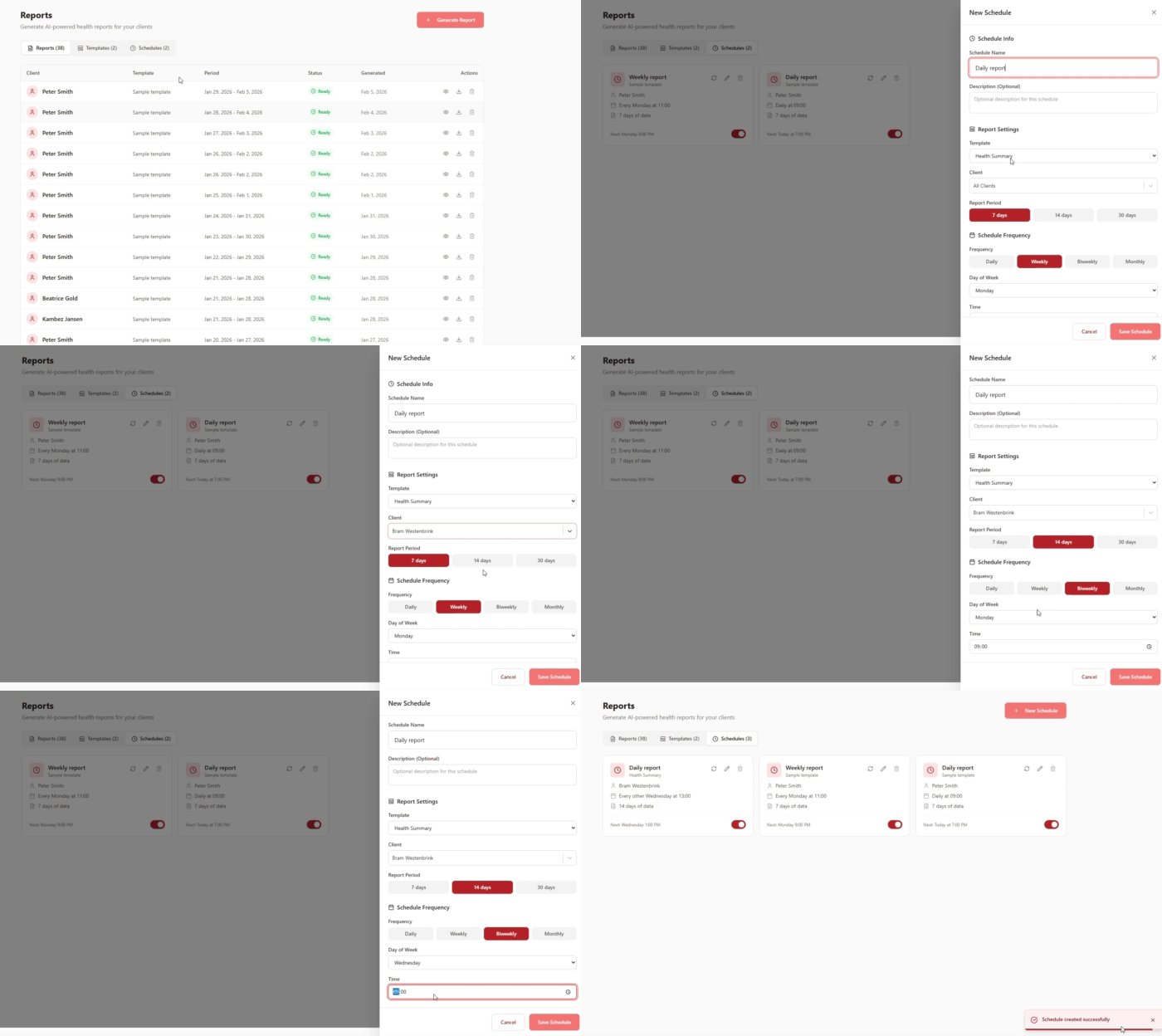
Set up recurring reports to generate and send automatically - daily, weekly, biweekly, or monthly on specific days and times
Rich Data Visualizations
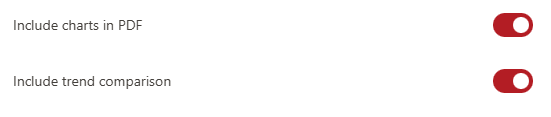
Toggle charts and trend comparisons on/off based on what you want to highlight in each report
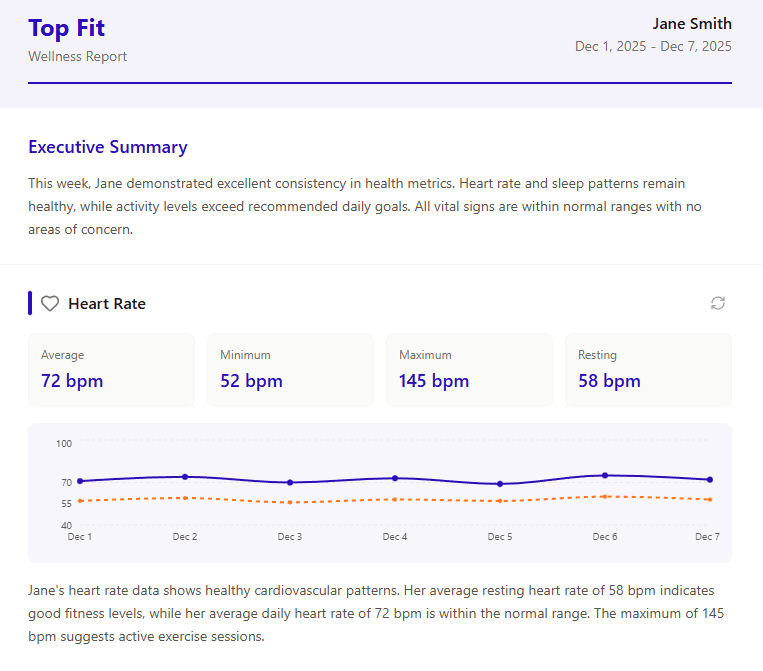
AI-Written Narratives Intelligent summaries explain what the data means in clear, client-friendly language
Personal Coach Notes
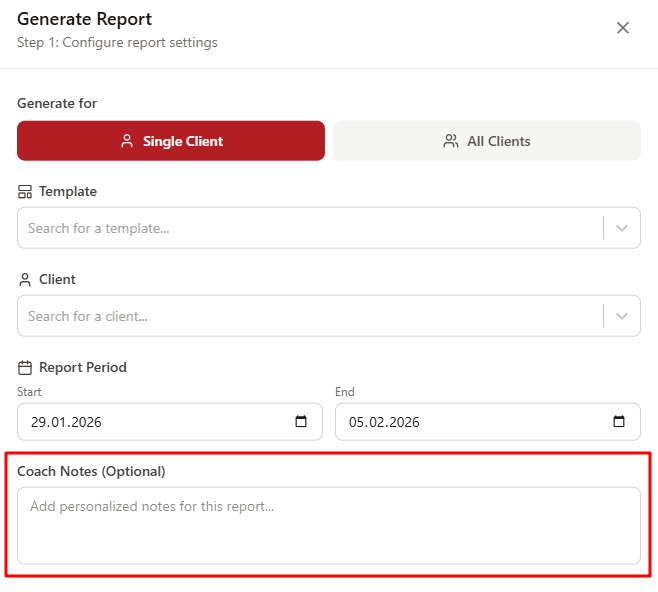
Add custom observations and recommendations to any report before sending
Multiple Delivery Options Download as PDF, send directly to clients via email, or share the report through your preferred messaging apps.
How It Works
1. Choose Your Generation Method Generate reports for a single client or bulk-create reports for all clients at once using the same template
2. Select Template and Period Pick from your saved templates (or create a new one) and set the date range: 7 days, 14 days, 30 days, or custom dates
3. Add Coach Notes (Optional) Include personalized observations, recommendations, or encouragement in the text field
4. Generate and Share The AI compiles data, creates visualizations, and produces a professional PDF ready to download or send directly to clients
Real-World Example
The Accountability Moment
You've been working with Jennifer for three months. She's been consistent with her habits and following your guidance, but lately she's expressed doubt: "I don't feel like anything's changing. Maybe this isn't working for me."
You open CardioMood and generate a 90-day progress report. In just a few minutes, you have a comprehensive 8-page PDF showing:
- Sleep Quality: Improved from 68% to 81% efficiency, with deep sleep increasing by 24 minutes per night
- Stress Management: Average daily stress levels down from 72 to 54, with fewer high-stress events
- Recovery: HRV baseline increased from 52ms to 64ms - a 23% improvement indicating better cardiovascular fitness
- Activity Consistency: 87% adherence to movement goals with steady progression
- Body Composition Correlations: Sleep and stress improvements correlating with 12-pound weight loss
The report includes beautiful graphs showing these trends, AI-generated explanations of what each metric means, and your personal coaching notes highlighting her wins.
You screen-share the report on your call. Jennifer sees, for the first time, the objective proof that her body is fundamentally healthier. The changes she couldn't "feel" are undeniable in the data. Her motivation is instantly restored, and she's excited to continue.
This report - which would have taken you an hour to create manually - took just a few minutes and might have just saved a client relationship.
What Makes CardioMood's Reports Different
Generic wellness apps might export CSV files or show basic charts. Traditional practice management tools require you to manually compile data and build reports from scratch. CardioMood Health Reports combine medical-grade physiological data with AI-powered analysis and professional presentation - all automated.
The reports don't just show numbers - they tell stories. The AI writes narratives explaining what the data means: "Your HRV improvement of 23% indicates significantly enhanced cardiovascular fitness and stress resilience. This correlates strongly with your improved sleep quality and consistent meditation practice."
More importantly, these reports are built on clinically-validated data. When you show a client their sleep quality improved by 13%, it's based on sleep stage analysis accurate to 99.2% against clinical polysomnography - not a consumer device's best guess. This level of credibility differentiates you from coaches using consumer fitness trackers.
Getting Started
Create your first template - Name it (e.g., "Weekly Health Summary"), select which health sections to include, set your branding colors, and save
Configure default settings - Choose your preferred report period (7, 14, or 30 days), enable charts and trend comparisons
Generate a test report - Select a client who's been active for 4+ weeks and create a sample report to see the output
Add personalized coach notes - Use the optional notes field to include your observations and recommendations
Set up automated schedules - Create recurring report schedules for different client segments (e.g., weekly reports every Monday for premium clients)
Build a template library - Create multiple templates for different purposes: onboarding assessments, monthly progress reports, program completion summaries
Frequently Asked Questions
Can I customize which health metrics appear in reports? Yes. When creating templates, you can toggle any section on or off: Heart Rate, Sleep Analysis, Activity & Steps, Blood Oxygen (SpO2), Temperature, Respiration Rate, Nutrition Summary, and Coach Notes. Create different templates for different client types or program focuses.
How do automated report schedules work? Set up a schedule once with your chosen template, client selection (individual or all clients), report period, and delivery frequency (daily, weekly, biweekly, or monthly). The system automatically generates and sends reports at your specified day and time - no manual work required.
Can I generate reports for all clients at once? Yes. Choose "All Clients" when generating reports, select your template and date range, and the system creates individual reports for your entire roster. This is perfect for monthly progress reporting across your practice.
What if a client is new and doesn't have much data yet? The system requires at least 2 weeks of data for meaningful reports. For newer clients, you can generate baseline assessment reports that establish their starting point rather than showing progress trends.
Can I add my own observations to reports? Absolutely. Every report includes an optional Coach Notes field where you can add personalized observations, recommendations, encouragement, or any context you want to include before sending.
How does template branding work? Each template lets you set your company name, primary color, and secondary color. These branding elements appear throughout the generated PDF, making reports look like they came directly from your practice.
Can I edit the AI-generated narratives? Yes. The AI provides professional-quality first drafts explaining what the data means, which you can customize with client-specific insights before finalizing the report.
What's the difference between charts and trend comparisons? Charts show data visualizations for the selected period. Trend comparisons show how current metrics compare to previous periods (e.g., "HRV improved 15% vs. last month"). You can enable or disable these independently in template settings.
Are reports HIPAA-compliant? Yes. All reports are generated and stored within CardioMood's HIPAA-compliant infrastructure. PDFs can be securely shared through the platform or exported for your records.
Can clients access their own reports? No, clients cannot view reports directly in the app. After a report is generated, the coach either shares it with the client or reviews it together during a session.
Ready to showcase your coaching impact? Create professional health reports that prove results and build client confidence in seconds, not hours.