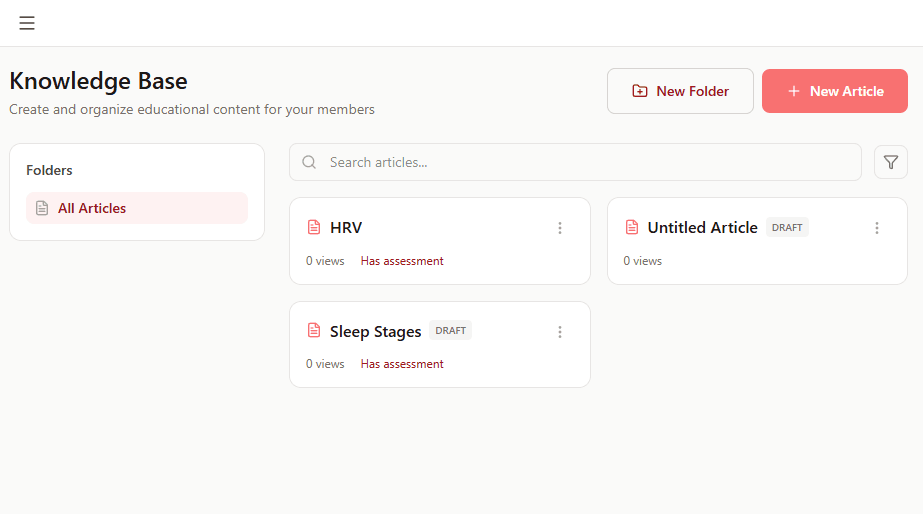
CardioMood's Knowledge Base lets you create, organize, and assign educational content that teaches clients about health, wellness, and behavior change. Build your library of articles, videos, guides, and resources once, then automatically deliver the right content to the right clients at the right time. It's like having your coaching wisdom available 24/7, even when you're not in a session.
Key Features and Benefits
Create Content Your Way
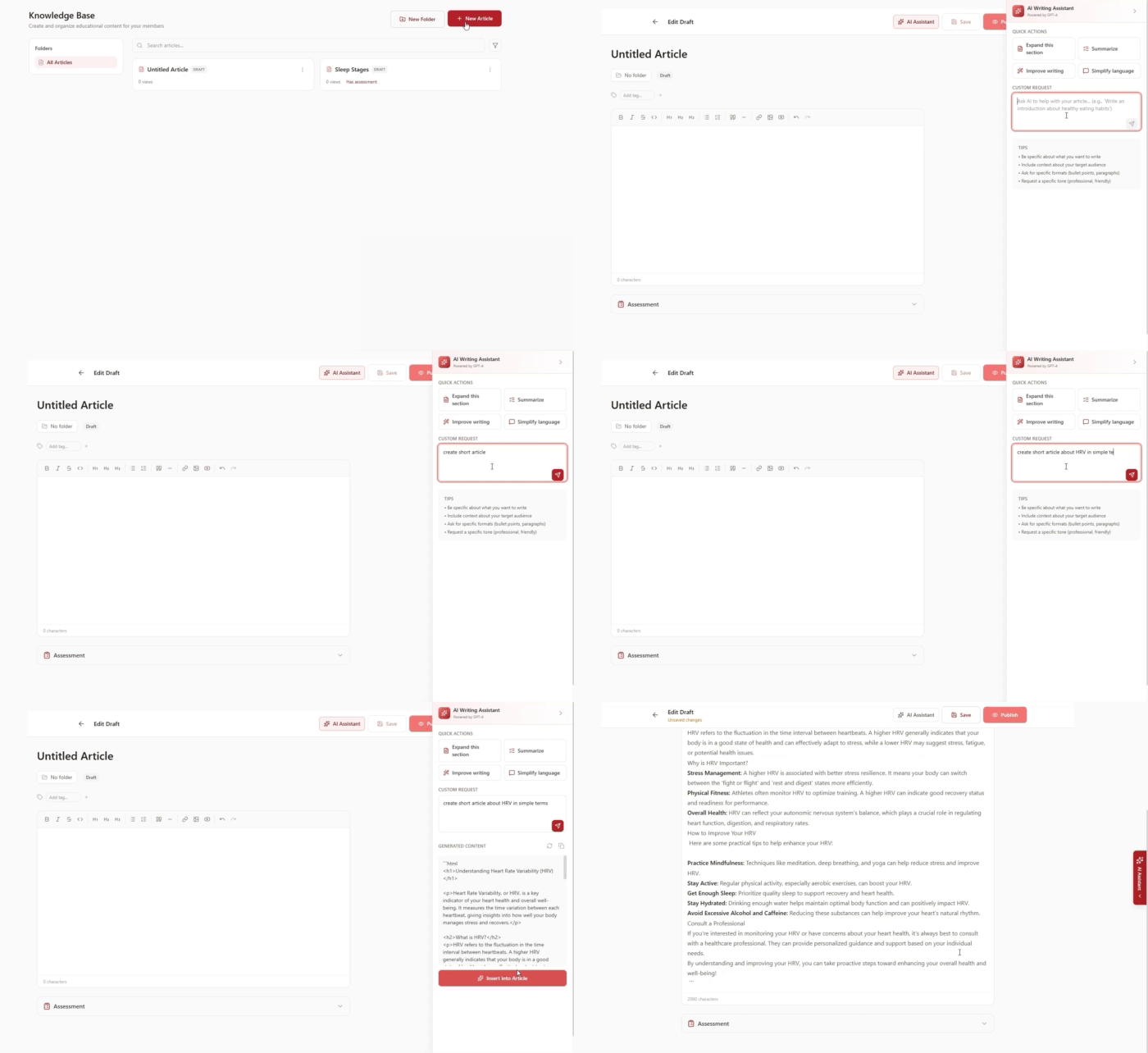
Write articles from scratch using the built-in text editor or speed up creation with the AI Assistant that generates educational content based on your prompts
Organize with Folders
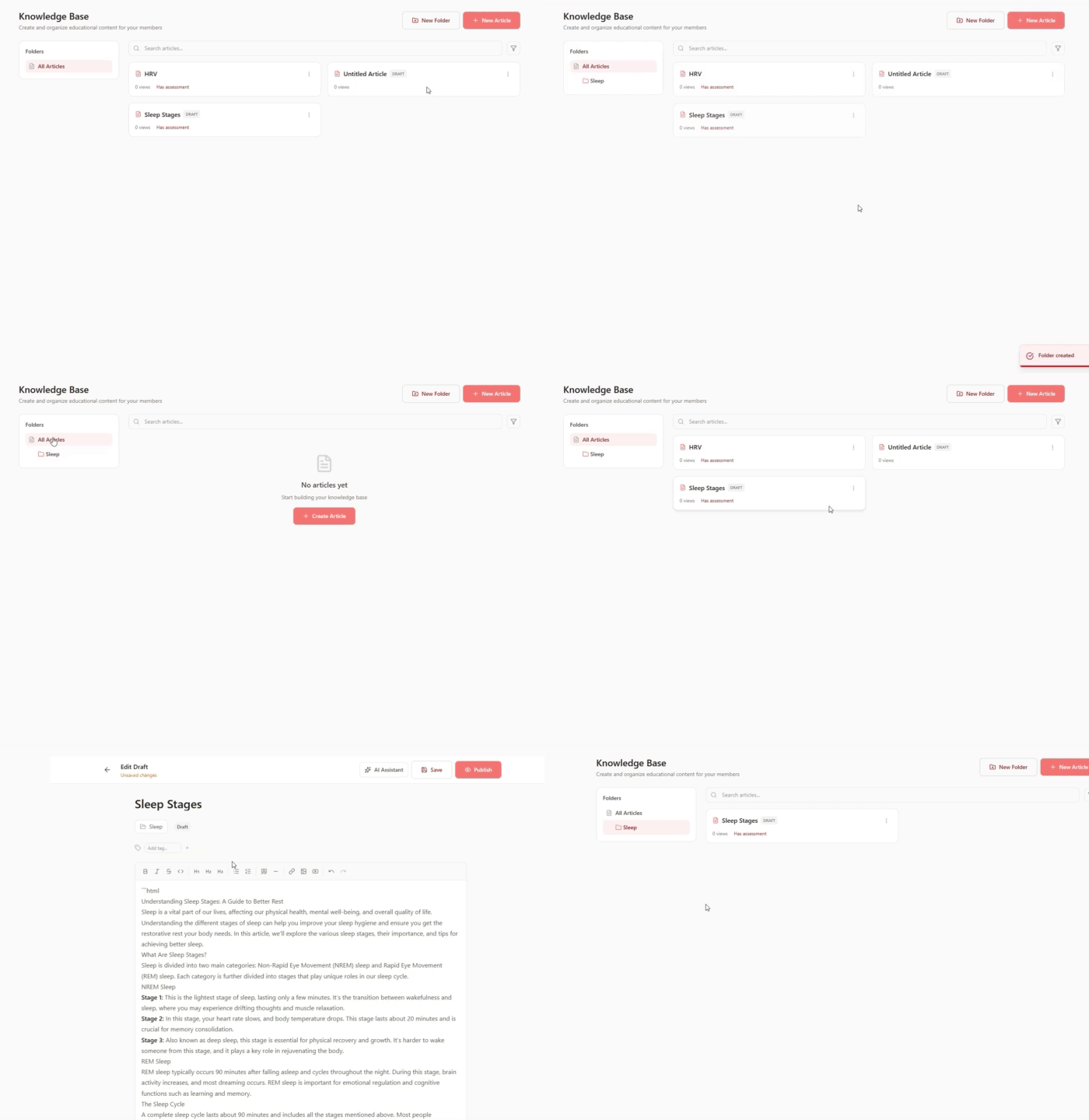
Structure your content library with folders and categories for easy navigation and management
Powerful Search Instantly find any article in your library with smart search functionality
Built-In Assessments
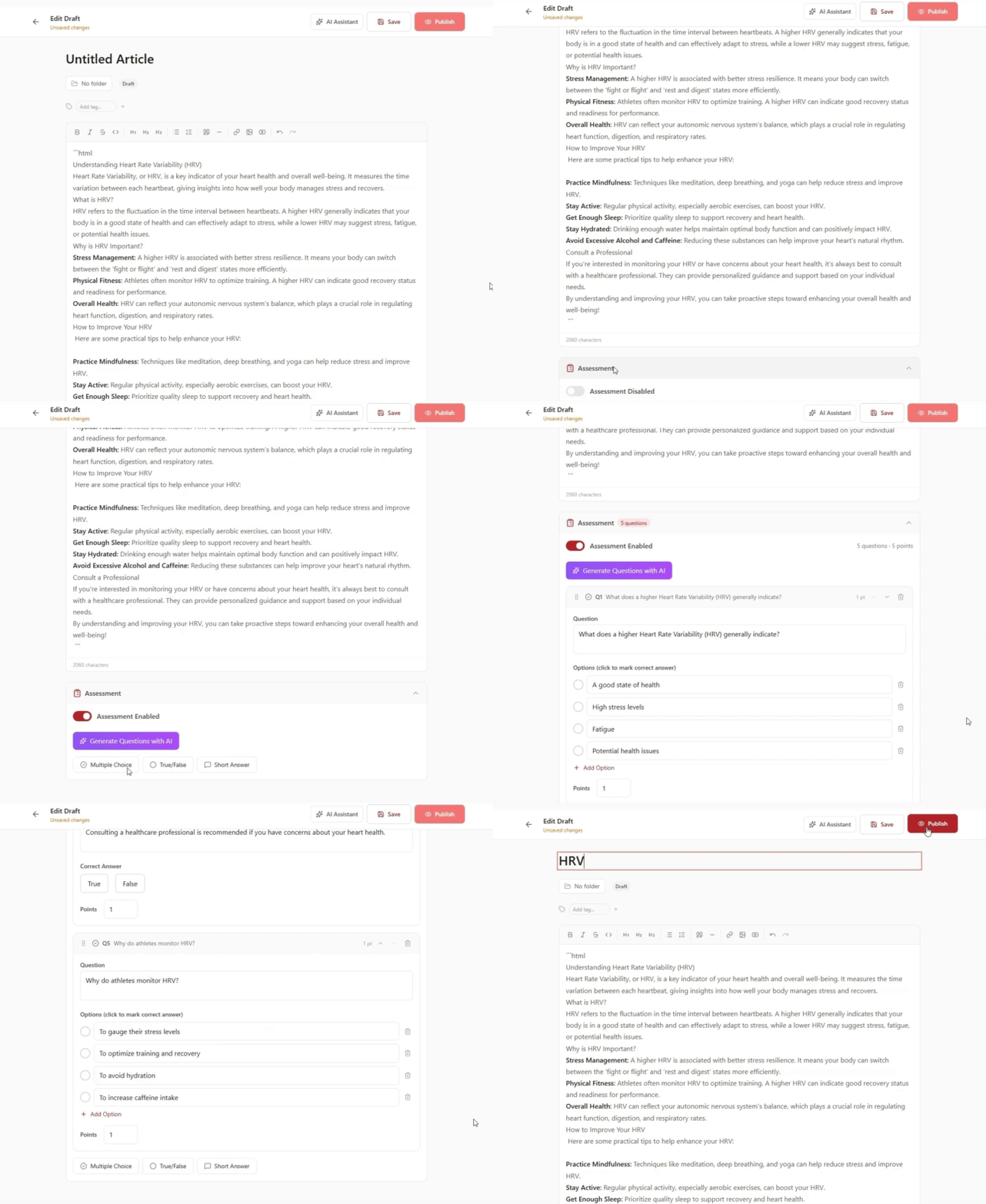
Add quizzes and assessments to articles manually or generate them using AI - choose from Multiple Choice, True/False, or Short Answer questions
Flexible Assignment
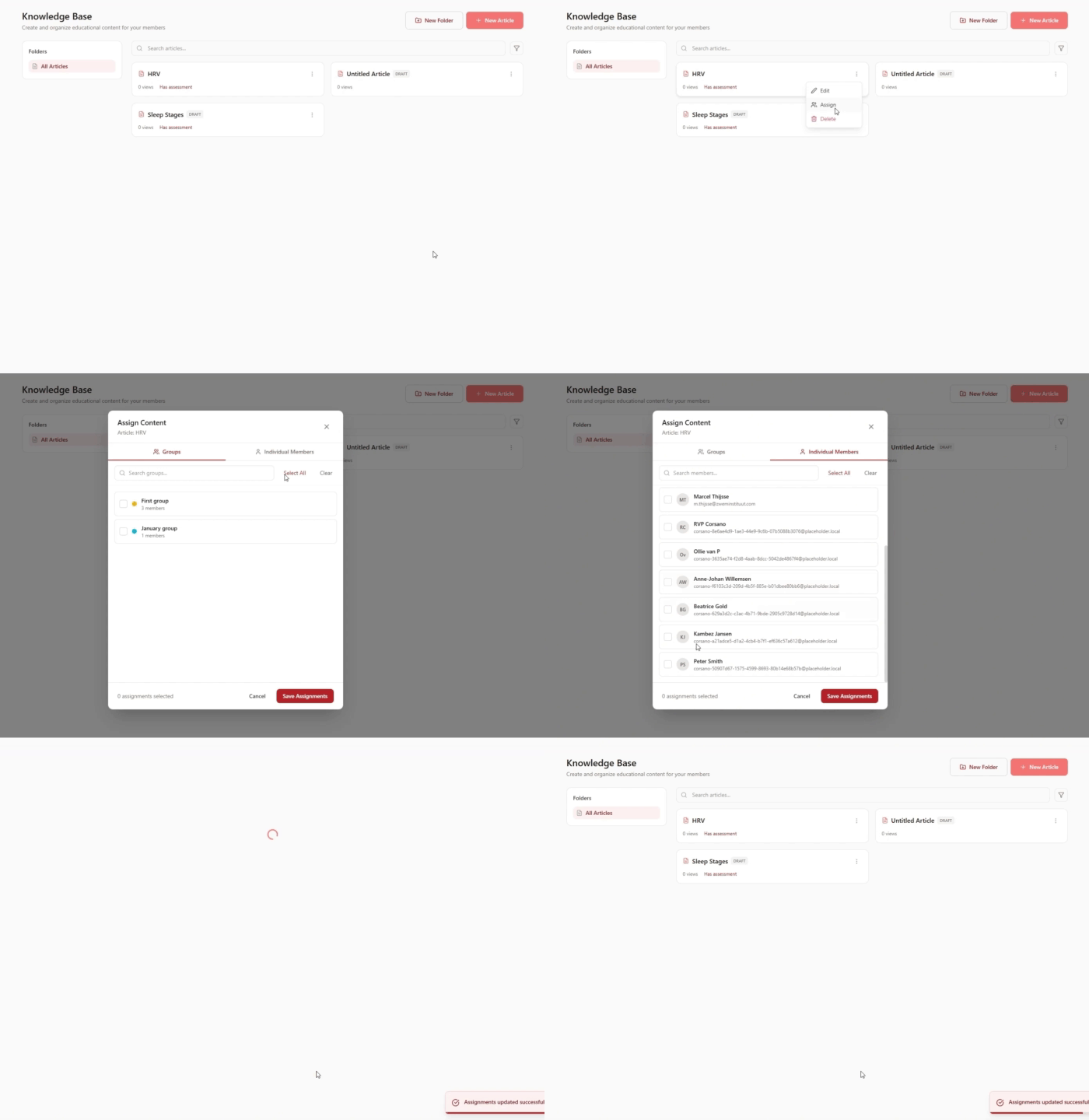
Assign content to specific clients, groups, or your entire practice with a few clicks
Track Engagement See which clients have read assigned content, and their assessment scores
Easy Content Management Edit, delete, or reassign articles anytime as your content library evolves
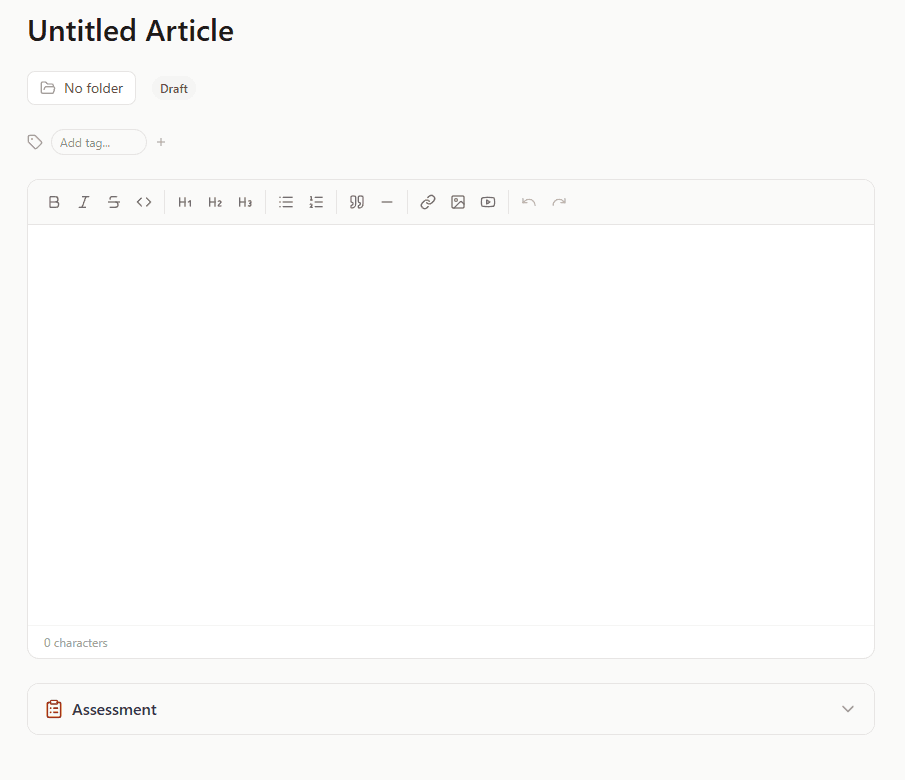
Rich Text Editor
Format articles with headers, bullet points, images, videos, and links for engaging learning experiences
How It Works
1. Create Your Content Click "New Article" and either write from scratch using the text editor or use the AI Assistant to generate educational content based on your topic and goals
2. Add Assessments (Optional) Enhance articles with quizzes - create Multiple Choice, True/False, or Short Answer questions manually, or let the AI generate relevant assessments automatically
3. Organize in Folders Structure your library with folders by topic (sleep, nutrition, stress, exercise) for easy management and quick access
4. Assign to Clients Select individual clients from your list or assign to entire groups with one click - edit, delete, or reassign content anytime as needs change
Real-World Example
Scaling Your Sleep Expertise
You're a health coach who specializes in sleep optimization. You've perfected your sleep education curriculum through years of client work, but you find yourself repeating the same foundational concepts in every initial consultation.
You build a Knowledge Base library:
- Week 1: "Understanding Your Sleep Architecture" (explaining sleep stages, cycles, and why they matter) + True/False assessment
- Week 2: "The Sleep-Stress Connection" (how HRV and cortisol affect sleep quality) + Multiple Choice quiz
- Week 3: "Optimizing Your Sleep Environment" (temperature, light, noise, bedding) + Short Answer reflection
- Week 4: "Building a Sleep Routine" (wind-down protocols, consistency, timing) + Multiple Choice assessment
Using the AI Assistant, you generate each article in minutes by providing the topic and key points. The AI also creates relevant quiz questions to test comprehension.
You create a "Sleep Coaching - New Clients" group and assign all four articles. Each client receives the content automatically when they join the program.
Now when you have your first formal coaching session in Week 2, clients already understand the fundamentals. They've read the articles and completed the assessments (you can see their scores in the dashboard). You're not explaining what REM sleep is - you're discussing how to improve their specific REM deficiency shown in their data. Your 45-minute sessions become exponentially more valuable because the educational groundwork is already laid.
Over a year, this library saves you 15-20 hours of repeating basic education while delivering a more consistent, professional onboarding experience. Better yet, clients who engage with the content show 40% better adherence to your recommendations because they understand the "why" behind your guidance.
What Makes CardioMood's Knowledge Base Different
Standard content platforms like Notion or Google Docs can store resources, but they lack coaching-specific features like assessments, client assignment tracking, and AI content generation. Course platforms like Kajabi deliver structured learning but don't integrate with health coaching workflows or client management.
CardioMood's Knowledge Base is purpose-built for health coaches. The AI Assistant understands health and wellness topics, generating accurate educational content that you can review and customize. The built-in assessment tools let you verify client understanding without third-party quiz platforms.
Most importantly, the Knowledge Base lives inside your coaching platform alongside client data, messaging, and health metrics. When you assign an article about HRV, you can immediately see if the client read it during your next session. Assessment scores appear in client profiles, showing you who needs additional support on specific topics.
Getting Started
Use AI Assistant for your first articles - Generate 2-3 foundational pieces by providing topics and key points to the AI
Create folder structure - Organize content into categories like "Getting Started," "Sleep," "Nutrition," "Stress Management"
Add assessments to key articles - Use AI to generate quiz questions or create your own to test client understanding
Assign to a test group - Start with a small group of clients to refine your content before rolling out broadly
Review engagement and assessment scores - Check which articles clients read and how they perform on quizzes
Build your library over time - Add new articles as topics come up in coaching sessions rather than trying to create everything at once
Frequently Asked Questions
How does the AI Assistant help create content? Provide the AI with your topic and key points, and it generates complete educational articles for you to review and customize. This speeds up content creation from hours to minutes while maintaining your expertise and voice.
What types of assessments can I create? Choose from Multiple Choice questions, True/False statements, or Short Answer prompts. Create them manually or use the AI to generate relevant quiz questions based on your article content.
Can I assign content to groups of clients? Yes. Create client groups (e.g., "New Clients," "Sleep Program," "Weight Loss Coaching") and assign articles to entire groups with one click. You can also assign to individual clients from your client list.
Can I edit articles after I've assigned them? Absolutely. Edit content anytime and changes appear for all clients who have access to that article. You can also delete articles or reassign them to different clients or groups as your practice evolves.
How do I know if clients actually read the content? The engagement tracking shows you which clients have accessed each article, and their assessment scores if you included quizzes.
Can I use the search function to find specific articles? Yes. The search feature lets you quickly find any article in your library by title, tags, or keywords - essential as your content library grows.
Do I need to be a writer to create good content? No. The AI Assistant handles the writing based on your expertise and input. Provide the topic and key teaching points, then review and customize the generated content to match your voice and methodology.
Can I organize articles into folders? Yes. Create folders and subfolders to organize content by topic, program type, difficulty level, or any structure that makes sense for your practice. This keeps your library organized as it grows.
Ready to scale your expertise? Build a Knowledge Base that educates clients automatically while you focus on high-value coaching conversations.